AmebaDocs
latest

Open Source SDKs

  • Arduino SDK
  • MicroPython SDK
    • Getting Started
    • Download
    • Examples
      • Peripheral Examples
        • [RTL8722CSM] [RTL8722DM] ADC - Read potentiometer
        • [RTL8722CSM] [RTL8722DM] GPIO - Blink
        • [RTL8722CSM] [RTL8722DM] I2C - Send and Receive
        • [RTL8722CSM] [RTL8722DM] PWM - LED fade
        • [RTL8722CSM] [RTL8722DM] RTC - Get time
        • [RTL8722CSM] [RTL8722DM] Socket - Echo Server and Client
        • [RTL8722CSM] [RTL8722DM] Socket - Get information from HTTP website
        • [RTL8722CSM] [RTL8722DM] SPI - Slave Receive
        • [RTL8722CSM] [RTL8722DM] Time - Delay and Timing
        • [RTL8722CSM] [RTL8722DM] Timer - Periodical timer
        • [RTL8722CSM] [RTL8722DM] UART - Send and Receive
        • [RTL8722DM_MINI] SDFS - Data Editing
        • [RTL8722DM_MINI] SDFS - Directory Navigation
      • Network Examples
    • Board HDK
    • API Documents
    • Resources
    • Support
  • Standard SDK
AmebaDocs
  • »
  • MicroPython SDK »
  • Examples »
  • [RTL8722CSM] [RTL8722DM] GPIO - Blink
  • Edit on GitHub

[RTL8722CSM] [RTL8722DM] GPIO - Blink

Materials

  • Ameba x 1

  • LED x 1

  • Resistor(220ohm) x 1

Steps

Blink is one of the best examples to get started with MicroPython.

Let us connect pin PB_22 to the anode leg of an LED which in series with a current limiting resistor and GND to cathode of the LED as shown below,
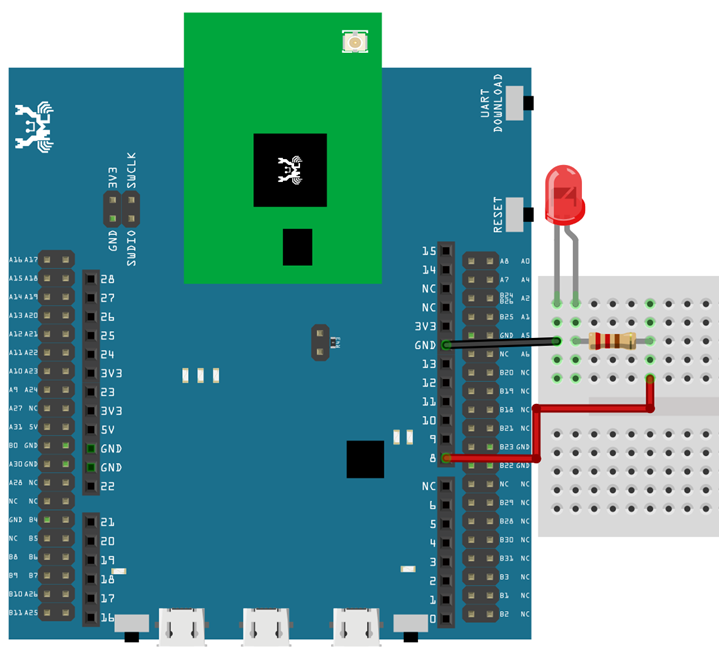
image1

Then, copy the following code and press Ctrl + e in REPL to enter the paste mode (for more information about REPL and paste mode, check “Getting Started” page). If you are using Tera Term, simply right click on any blank space of the terminal and paste the code into REPL, then press Ctrl + d to execute the code. If everything is order, you should be able to see the LED blink for 3 times in 3 seconds.

from machine import Pin
a = Pin("PB_22", Pin.OUT)
a.value(1)
time.sleep_ms(500)
a.value(0)
time.sleep_ms(500)
a.on()
time.sleep_ms(500)
a.off()
time.sleep_ms(500)
a.toggle()
time.sleep_ms(500)
a.toggle()
Previous Next

© Copyright 2021, Ameba IoT. Revision d77f6d32.

Built with Sphinx using a theme provided by Read the Docs.